Day to night: relighting a robot dataset with the Kite API
Our box-closing policy learned from demos recorded on a bright morning. Under evening lamps, its cameras saw a different scene. We relit the dataset to match, then made relighting an engine in the Kite API. Here is the process, the numbers, and what the robot did next.
Luigi D'Introno
Founder, Kite
Oct 5, 2026 · 6 min read

We're teaching two OpenYAM arms to close a cardboard box. We recorded 31 teleoperated demos on a bright morning, trained an ACT policy on them with Kite, and ran it on the real arms that afternoon. Its best run went 3.8 minutes before our safety guard stopped it.
That evening, under warm ceiling lamps, we stopped four runs within 10 to 36 seconds. The task hadn't changed. The light had.
The lighting gap
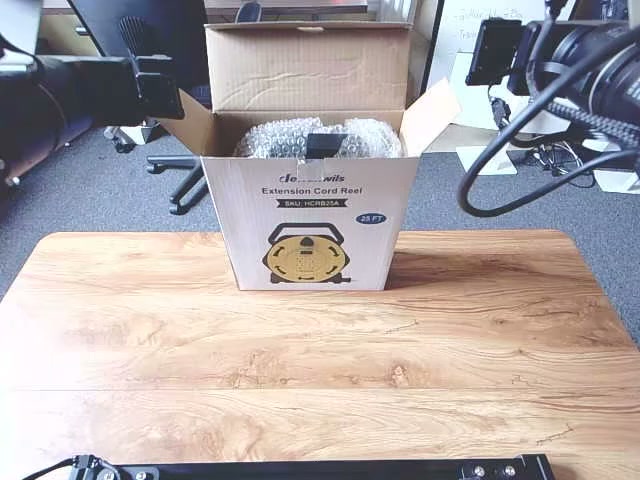
We compared the first frame of a training episode with a live frame from each camera. Brightness is the mean luma on a 0 to 255 scale. Warmth is the ratio of red to blue.
| Camera | Training | Live | What changed |
|---|---|---|---|
| Top | 166 · 1.03 | 81 · 1.55 | Half the light, much warmer |
| Left wrist | 90 · 0.88 | 36 · 1.23 | Less than half the light, warmer |
| Right wrist | 101 · 0.96 | 50 · 2.33 | Half the light, far warmer |
Every camera lost about half its light, and the light turned orange. A policy that learns from pixels sees a different scene. We could record every demo again at night, or change the pixels we already had. We tried changing the pixels, two ways.
Relight, don't regenerate
Our first call went to video augmentation, the generative engine in the Kite API. It redraws each clip from an instruction, which is what you want for new tables, objects or backgrounds. For a lighting change it was the wrong tool:
- Cost. Episode 0 cost 32,670 tokens for its first 30 seconds.
- Coverage. It generates up to 30 seconds of each of the first 50 episodes. Twenty-one of our first 50 episodes run longer than that, and their endings, where the last flap goes in, would be cut.
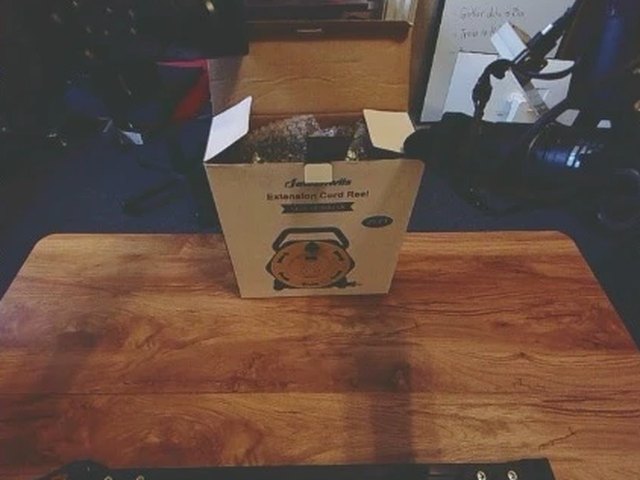
- Fidelity. It redraws every pixel. In episode 0 it put a yellow extension cord on the table, much like the one pictured on the box.
Between morning and evening only the light changed, not the scene. A colour transform covers that, and it leaves every pixel where it was. Relighting takes five numbers per camera: exposure in stops, colour temperature in kelvin (3000 K is warm tungsten), tint, contrast and saturation. It applies them to every frame. Motion, actions and timestamps stay exactly as recorded.
| Episode 0, three cameras | Tokens | Video covered | What changes |
|---|---|---|---|
| Relighting | 298 | 49.7 s, all of it | Colour only |
| Video augmentation | 32,670 | First 30 s | Every pixel, including what's in the scene |
For the 61 episodes we recorded, relighting everything at full length comes to about 9,700 tokens. Video augmentation would cover the first 50 episodes, cut to 30 seconds each, for about 1.3 million.
Relighting through the Kite API
Relighting is now an engine in the augmentations API, next to video augmentation. You send the dataset, a sentence, and a photo from each deployment camera:
kite augment create --repo-id kiteml/dual-openyam-close-box \
  -i "It now runs in the evening under warm lamps. Match the photos." \
  --reference-image top=live_top.jpg \
  --reference-image left_wrist=live_left.jpg \
  --reference-image right_wrist=live_right.jpg \
  --output huggingface --hf-repo your-org/close-box-evening --wait
The same call is a POST /v1/augmentations from code or kite_augment_create from an agent over MCP. Then:
- Pin. The run resolves the dataset to one commit and reads only that commit. Episodes you push mid-run don't leak in. Ours grew from 61 to 122 episodes during one run, which is how we learned to pin.
- Plan. A planner looks at one frame per camera and your photos, then picks relighting or video augmentation. For relighting it tunes each camera on its own: it previews a setting against your photo, measures the difference, adjusts, and commits.
- Relight. Every episode, full length, every camera. Videos are re-encoded with LeRobot's own codec settings and keep their original timestamps. Image statistics are recomputed from the new pixels. The rest of the dataset is copied as is, apart from a note on the dataset card.
- Deliver. You get a standard LeRobot dataset on Hugging Face, or as a download.
The run reports what the planner decided, and why. In our episode 0 test it chose relighting because "all three cameras need only brightness, colour temperature, contrast and saturation adjustments to match the warm night-lamp reference". Its settings, abridged:
"plan": {
  "engine": "relight",
  "relight": {
    "observation.images.top": {
      "exposure": -2.0, "temperature": 4200, "tint": 0.25,
      "contrast": 0.75, "saturation": 1.2
    },
    "observation.images.left_wrist": {
      "exposure": -1.7, "temperature": 5500, "tint": 0.05,
      "contrast": 1.6, "saturation": 1.0
    },
    "observation.images.right_wrist": {
      "exposure": -1.4, "temperature": 3200, "tint": 0.0,
      "contrast": 1.9, "saturation": 0.9
    }
  }
}
It charged 298 tokens and took about a minute. Here is how close each camera got:
| Camera | Training | Live | Relit | Match |
|---|---|---|---|---|
| Top | 166 · 1.03 | 81 · 1.55 | 92 · 1.46 | A little bright |
| Left wrist | 90 · 0.88 | 36 · 1.23 | 39 · 1.11 | Close |
| Right wrist | 101 · 0.96 | 50 · 2.33 | 49 · 3.21 | Right brightness, too warm |
The wrists land within 3 levels of their photos' brightness and the top camera within 11. The right wrist came
out warmer than its photo. To set the numbers yourself, send them as config.relight, per camera or for all of
them, and the planner is skipped.
The dataset and the policies
The relit episodes in our dataset came before the planner. We made them with one setting for all three cameras, fitted to the top camera. It matches the top camera almost exactly (81 · 1.54 against the live 81 · 1.55) and the left wrist closely, but leaves the right wrist cooler than its photo (1.38 against 2.33). We also relit in the other direction, so every demo exists in both lights. That evening we had recorded 30 more demos of the hardest step, inserting the last flap, and those were relit to daylight.
| Episodes | Count | Top camera, mean brightness | Lighting |
|---|---|---|---|
| 0–30 | 31 | 140 | Recorded on a bright morning |
| 31–60 | 30 | 103 | Recorded that evening, flap insertion only |
| 61–91 | 31 | 66 | Copies of 0–30, relit to the evening lamps |
| 92–121 | 30 | 151 | Copies of 31–60, relit to daylight |
The copies keep the actions, states and task of their originals, so only the pixels differ. The dataset is
kiteml/dual-openyam-close-box. Earlier versions
stay loadable from the tags v1-31-episodes and v2-61-episodes.
We trained policies on both versions with Kite:
- The 31 daylight demos: ACT, Diffusion Policy, π0.5, π0-FAST, X-VLA and VLA-JEPA.
- All 122 episodes: ACT, Diffusion Policy, π0, π0.5 and π0-FAST.
What the robot did
Only the two ACT policies have run on the arms so far, with the same runtime and the same safety guard. The guard stops a run when a new plan would start too far from where the arm actually is.
| ACT trained on | Runs | What we saw |
|---|---|---|
| 31 daylight demos, afternoon | 62 s – 3.8 min | Got partway; needed more flap demos |
| 31 daylight demos, evening lamps | 10 – 36 s | We stopped every run |
| All 122 episodes, next morning | 10 s – 1.9 min | Worse; hovered at the last step |
The policy trained on the augmented set did worse, and in daylight. But we changed two things at once. Besides the 61 relit copies, the new set had the 30 evening demos of the flap insertion. Sixteen of them end with the grippers still closed on the flap, while 26 of the 31 morning demos let go and back away. Our best explanation is that the policy learned two endings and hovered between them. Relighting changes pixels. It can't reconcile demos that disagree. And we haven't yet run it under the evening lamps, the one condition the relight was for.
So this run doesn't tell us whether relighting helps. The next one will: trim the conflicting endings, train the same ACT policy with and without the relit copies, and run both under each light.
Relighting is live in the API now. Set model to relight, or leave it on auto and the planner chooses. The
docs walk through the same example.